


- Coworking Resources
- Technology
SEO for coworking spaces: Easiest guide ever

TL;DR
Good coworking SEO starts with making it easy for search engines to understand where you are, what you offer and how people can take the next step.
Clear location details, service pages, metadata, internal links, FAQs and structured data all help. Our Members Portal handles much of the technical setup automatically, including SEO pre-rendering and structured data.
When someone needs a coworking space, meeting room or private office, search is the first place they look.
SEO has been a core part of my role since 2012, so I know how competitive it can be trying to rank. And now, AIO and GEO are changing the way people find information online.
The good news is that strong SEO foundations still matter. If your content is clear, well structured and easy for machines to understand, it is easier for search engines and AI systems to parse that information and serve it to the person looking for it.
My biggest piece of advice? Make your content easy to understand, for machines and humans.
Good SEO isn’t just about adding keywords to a homepage. Search engines need to understand where you are, what you offer and which pages on your website are useful to someone searching for workspace.
The technical side matters too. Your pages need to be accessible to everyone using the internet, including people who rely on assistive technologies, as well as to search crawlers.
Content should be clearly structured and connected through internal links, making information easy to find and your site logical to navigate.
Here are the SEO basics for coworking spaces, and the areas worth paying attention to.

1. Make your location crystal clear
For a coworking operator, SEO is heavily tied to location.
Someone looking for a desk is much more likely to search for:
- Coworking space in Shoreditch
- Meeting rooms in Bristol
- Hot desks near Manchester Piccadilly
- Private offices in Birmingham city centre
than simply “coworking space”.
Make sure each location clearly includes its:
- Location name
- Full address
- Phone number
- Opening hours
- Local area or neighbourhood
- Services and workspace types
It’s a very good idea to make this information consistent across your website, Google Business Profile and other directories.
It also helps when you include information as structured data. This is simply machine-readable information that tells search engines what a page represents.
And yes, the Nexudus Members Portal automatically includes location information such as your name, address, phone number and coordinates in structured data, helping search engines understand the physical location connected to your website.
2. Describe what you offer, properly
“Flexible workspace” might sound neat in marketing copy, but it doesn’t tell a search engine — or a potential customer — very much. You need to get descriptive.
Here’s what we mean: Instead of “Flexible workspace for everyone” you might say:
“Hot desks, dedicated desks and private offices in central Bristol, with meeting rooms available by the hour.”
That’s so much clearer, right?
It’s also a great idea to think about the language potential members would actually use when searching. In coworking, these terms are universally understood:
- Hot desks
- Dedicated desks
- Private offices
- Meeting rooms
- Event space
- Day passes
- Virtual offices
- Coworking memberships
Nexudus lets operators add descriptions for Workspace, Bookings and Community services. These descriptions are included in the version of the page presented to search engines, giving crawlers more context about what your location offers.
The rule is simple: write for people first, but give search engines enough detail to understand the page.
3. Give every important page a clear purpose
One common SEO mistake is expecting the homepage to rank for everything.
A person searching for a meeting room has different intent from someone comparing monthly coworking memberships.
Where possible, give important services their own discoverable pages.
What do we mean? We mean set up pages like this:
- /meeting-rooms
- /hot-desks
- /private-offices
- /events
- /book-a-tour
This gives search engines a clearer page to return for each type of search.
Your page headings, copy and metadata should reflect what each page offers. You’re helping the bots a lot with all of this.
4. Pay attention to your search title and description
The title and description shown in a search result help someone decide whether your page looks relevant enough to click.
Keep them clear rather than clever.
For example:
Title
Coworking Space in Bristol | Example Workspace
Description
Flexible hot desks, private offices and meeting rooms in central Bristol. Explore memberships, book a workspace or arrange a tour.
As a general guide, keep titles around 50–60 characters and descriptions around 150–160 characters.
In our Members Portal, operators can control SEO content through Settings > Features > Website > SEO. Banner copy, claims and service descriptions contribute to the information search engines receive about the page.
That means copy added to your portal isn’t only there for people browsing the site. It can also help search engines understand the business.
5. How to make sure search engines can read your snazzy site
Modern websites are often dynamic applications, where much of the content is loaded after someone opens the page.
That can create problems if a search crawler doesn’t receive enough useful information when it visits.
One solution is pre-rendering.
Fancy having a Members Portal that automatically gives search crawlers a pre-rendered version of your public pages? Our includes:
- Page titles and meta descriptions
- Structured data
- Navigation links
- Location and service information
It happens automatically, without operators needing to configure a separate version of the website.
This gives search engines a clear representation of the page even though the Members Portal itself is a dynamic application.

6. Help crawlers find your important pages
Search engines use crawlers to discover and revisit pages across the web. Internal links help those crawlers move around your site, understand how pages relate to one another and find deeper content.
You can also help search engines find important pages by submitting an XML sitemap or requesting page indexing through Google Search Console.
Good internal linking serves two purposes: it makes your site easier for people to navigate and helps search engines understand your site structure.
Your homepage should make important pages easy to find, and these are highly likely to be things like:
- Memberships
- Workspace bookings
- Meeting rooms
- Events
- FAQs
- Tours
- Contact details
We’ve made it so the Members Portal automatically generates navigation links between relevant public pages. Booking pages can connect visitors and crawlers to sign-up, tours, contact information and other bookable resource types.
Making your site clear and easy to navigate helps people and search engines. Never forget that search engines exist to help people find information online, so put people first and you’ll make good decisions.
7. Answer the questions prospective members already ask
FAQs can be useful SEO content because they often match the language people use when searching.
I bet your team gets asked these a lot:
- Can I book a desk for one day?
- Do I need to be a member to book a meeting room?
- Is coffee included?
- Can I bring guests?
- Do you have parking?
- Can I book a tour?
- Are meeting rooms available at weekends?
These aren’t just support questions. They can help explain your offer before someone contacts your team.
Public FAQ pages in Members Portal also include FAQPage structured data, giving search engines a machine-readable version of your questions and answers.
One thing though: write FAQs around questions people genuinely ask. Writing fake questions purely to squeeze in keywords? Ew.
And while we’re talking about FAQs, our team has been working on something rather interesting with AI.
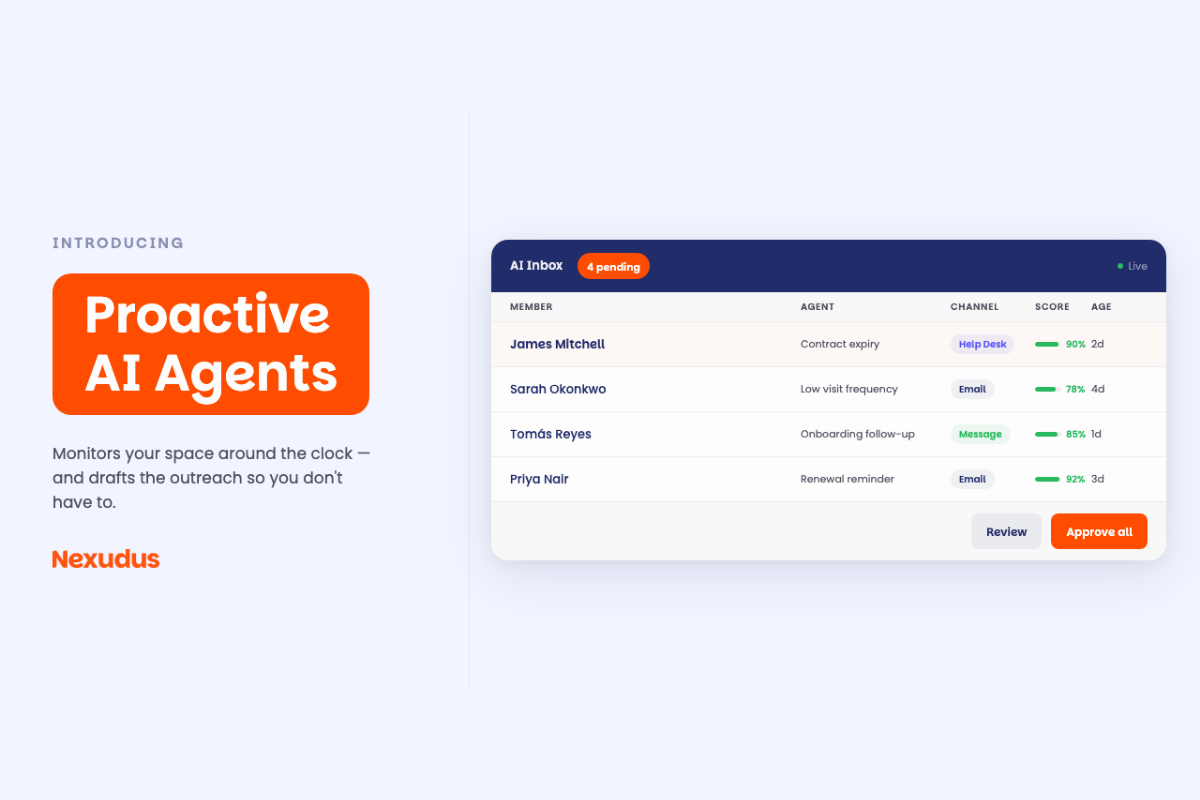
Our proactive AI FAQs agent can look across your enquiries, spot questions that keep coming up but aren’t answered on your website, and suggest new FAQs. It can even draft the answers based on your space’s policies and operations, ready for you to review and approve.
Just saying.
8. Publish useful local content
Your main pages explain what you sell. Your blog gives you room to answer a much wider range of searches.
And it’s a great opportunity to talk about your community. You can ask local organisations and businesses to guest post. This gives people a sense of where they’ll be working, what’s nearby and what the area is like while building local relevance around your site.
Need a kickstart? How about
- Where to work remotely in your city
- Guides to local businesses, shops, galleries, classes and parks
- Networking events in your area
- Tips for growing a remote team
- Workspace trends
- Stories from your member community
You don’t need to publish constantly.
A smaller collection of genuinely useful articles that relate closely to your locations, services and audience is more useful than publishing generic posts just to keep the blog busy.
9. Run a simple coworking SEO audit
You don’t need an enormous spreadsheet to work out whether the basics are covered (we can get into that another time).
Let’s keep it light with an easy coworking SEO audit that starts with these questions:
Can Google understand where we are?
Check your address, location information and Google Business Profile.
Can it understand what we sell?
Look at the language used on your homepage and service pages. Is it clear and obvious what you offer?
Does each important service have a discoverable page?
Check meeting rooms, offices, desks, tours and other key services.
Are page titles and descriptions useful?
Make sure they’re descriptive, relevant and unique, rather than duplicated across the site.
Can search crawlers reach our public pages?
Check your navigation and internal links. Think about the anchor text you use for links and avoid using things like ‘click here.’ The words you use in links should give people (and crawlers) a pretty good idea of what’s on the other side.
Are our FAQs useful and publicly accessible?
Private content isn’t available to search engines. Double check this.
Do we know what Google is indexing?
Use Google Search Console to see which pages appear in Google’s index, which searches generate impressions and whether Google reports crawling problems.
Clarity first, SEO will follow
Good SEO for coworking spaces isn’t about finding clever ways to manipulate search rankings. The fundamentals are much simpler, and, really, they’re about building trust in your brand.
Make it obvious where your space is, what people can book, who it’s for, what facilities and services are available and how someone can take the next step.
Then make sure search engines can access and understand that information.
Our Members Portal handles much of the technical foundation automatically, including SEO pre-rendering, structured data and crawler navigation. That leaves operators to concentrate on the bit technology can’t decide for them: how best to describe their spaces, services and communities.
Get those foundations right and you’re not just making your site easier to find. You’re giving yourself a much better base for creating truly useful content.

Want to know more about
how Nexudus could help your business?
We’re here to answer any questions you have.
Latest articles
-

- New Releases
- Technology
CFDI invoice stamping is now available in Nexudus
Jane Robathan on October 27, 2026 -

- New Releases
- Technology
What if selling cowarehousing space worked like e-commerce?
Jane Robathan on October 22, 2026 -

- Coworking
- Technology
Nexudus AI Agents: The Different Types and What They Do
Emily Nguyen on October 12, 2026