

Training Team on September 10, 2026
Team Admins and Contract Cancellations
We’ve added a new setting so space operators can prevent team admins from cancelling their own contracts while still allowing them the flexibility to manage their team members’ contracts.
In the Admin Panel, navigate to Settings > Modules > Team.
The new setting is ‘Team administrators can cancel contracts for members in their teams’ and is disabled by default.
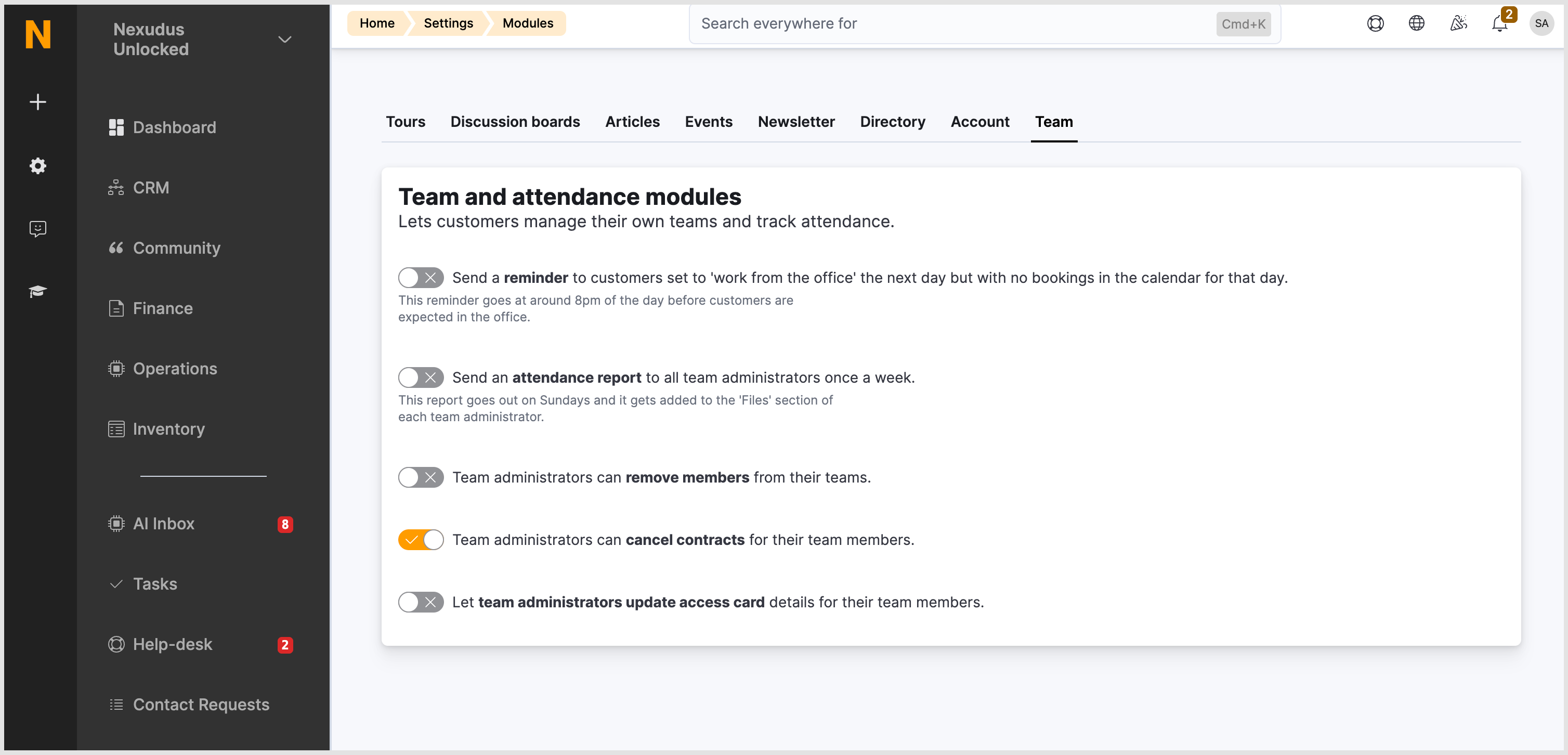
This setting is separate from the Users can change or cancel their plan setting (Settings > Modules > Account).
Scenario 1:
- Desired set-up: Team admins can cancel their team members’ contracts but not their own.
- Disable: Users can change or cancel their plan
- Enable: Team administrators can cancel contracts for members in their teams
Scenario 2:
- Desired set-up: Team admins can cancel their team members’ contracts and their own.
- Enable: Users can change or cancel their plan
- Enable: Team administrators can cancel contracts for members in their teams
How cancellation logic works
There are two people who can cancel a contract through the portal: the customer who holds the contract, and their team administrator.
However, there are rules that decide whether cancellation is allowed:
- The plan must allow cancellations. If the plan has the Customers in this plan can cancel their plan from the portal or the app setting disabled, nobody can cancel that contract online – not the customer, not a team admin. They’d have to contact the office.
- User settings. Customers can only cancel their plan from the portal or the app if the Users can change or cancel their plan setting is enabled in the Admin Panel > Settings > Modules > Account.
- New team administrator settings. Team administrators can cancel contracts held by anyone on their team, but only if the Team administrators can cancel contracts for members in their teams setting is enabled. Without that enabled, a team administrator cannot cancel a contract.
- It has to be your contract. Even with the appropriate settings enabled, customers can only act on contracts that belong to them – either because it’s their own contract, or because they are a team admin that the person belongs to.
- Notice periods still apply. A plan cannot be cancelled earlier than the defined notice period.
Want to know more about
how Nexudus could help your business?
We’re here to answer any questions you have.