

Booking Check-Out Automation
You can now keep booking attendance data accurate without any manual effort. Two new automation behaviours handle check-out for booking owners and their visitors – one triggered automatically when a booking ends, and one triggered whenever a member checks out of the space.
Automatic booking check-out setting
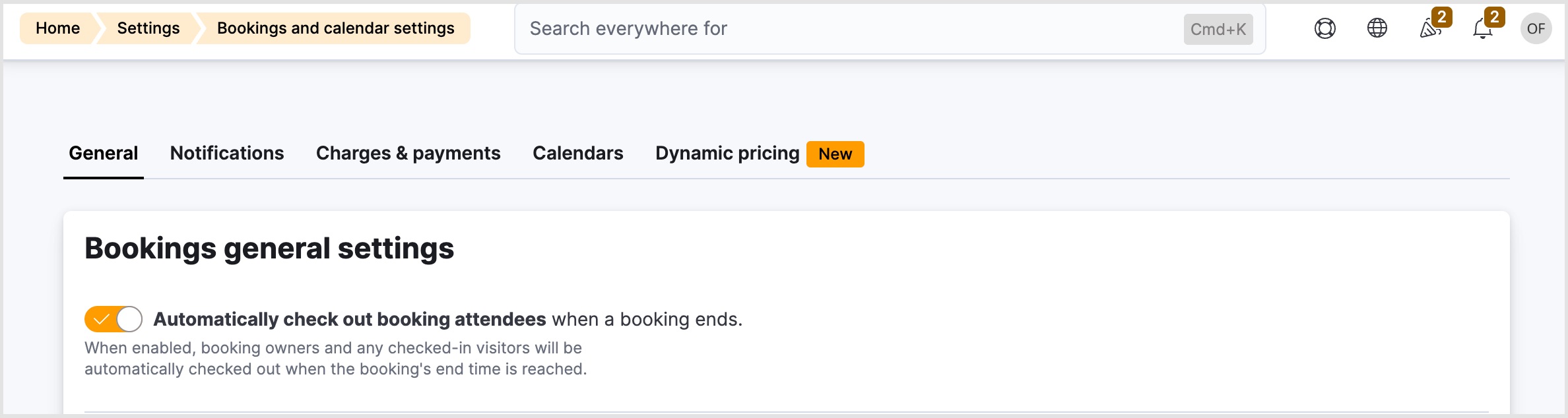
Previously, booking owners and their visitors remained checked in even after their booking’s end time passed. You can now enable a setting that automatically checks out all booking attendees – owners and any checked-in visitors – as soon as the booking ends.
To enable automatic booking check-out:
- Navigate to Settings > Bookings and calendar settings.
- Enable the Automatically check out booking attendees when a booking ends toggle.
- Click Save changes.
The automatic check-out runs as a background task every five minutes. There may be a short delay of up to five minutes between a booking ending and attendees being marked as checked out.
Streamlined manual check-out
The manual checkout flow has been improved to save time and ensure consistency. When a member checks out of a space, they will automatically be checked out of all bookings they had checked into on that day.
This behaviour is automatic and requires no configuration.
Want to know more about
how Nexudus could help your business?
We’re here to answer any questions you have.