


- Coworking
- Coworking Resources
Your Coworking Software Blueprint for Operational Success

Coworking software is the system that runs your workspace. It handles bookings, memberships, billing, and day-to-day operations in one place, so your team isn’t managing everything manually.
If you’re running a flexible workspace, it’s what connects your website, your members, and your internal operations.
Why it matters
Without it, most spaces rely on spreadsheets, email, and manual processes to manage bookings, invoices, and member access. That works early on, but it doesn’t scale.
Coworking software replaces that with:
- Bookings and payments
- Real-time availability across desks and rooms
- Membership management and billing
- Reporting on occupancy and revenue
What this guide covers
- The core features of coworking software
- How it’s used day to day
- What to look for when choosing a platform
For anyone in doubt about whether you need software to handle your ops, consider the stats.
WeWork's US and UK survey reports that 59% of companies looking for more offices will choose flexible spaces in the next two years.
That's pretty wild.
What can coworking software actually do?
Coworking management software is built to manage multiple members, spaces, and revenue streams in one system. It handles bookings, billing, access, and reporting, so operators don’t rely on spreadsheets or manual processes.
Core features
- Bookings and scheduling
Manage reservations for desks, meeting rooms, offices, and events in real time. - Membership management
Handle sign-ups, renewals, and flexible membership plans. - Billing and invoicing
Automate payments, invoices, and track financial activity. - Access control
Integrate with smart locks or keycards for secure, self-serve entry. - CRM and lead tracking
Capture and manage leads, and track your sales pipeline. - Analytics and reporting
Monitor occupancy, revenue, and usage trends. - Integrations and apps
Connect with accounting, marketing, and communication tools, plus mobile apps for members.

How coworking software supports your operations
What operational tasks should a coworking platform take care of? There are five categories that make up coworking operations, and each need different tasks managed.
Let’s go over the capabilities you need.
1. Space management – your most essential need
Every operator needs a smart tool to handle reservations for the desks, rooms, and resources members use daily.
Booking systems
Digitising your booking system lets members and teams easily reserve desks, offices, meeting rooms, and event venues. Systems show real-time availability, enforce booking rules, manage flexible access credits, and apply cancellation policies.
Resource scheduling
Coworking platforms can also manage bookable resources like podcast booths, parking, AV equipment, and other shared amenities. Operators can set access rules, time limits, and extra charges to improve utilisation and monetise underused assets.
Floor plans and utilisation analytics
Interactive floor plans help members find and book preferred spaces more easily, while giving operators better visibility into how desks, offices, and shared areas are being used. This helps teams optimise layouts, occupancy, and revenue.
Maintenance and ticketing
Many coworking platforms include maintenance and ticketing tools so members can quickly report issues through the app or member portal. Requests are logged, assigned, and tracked centrally, helping teams resolve problems faster and maintain a better member experience.
-

Need to get more from your space?
A guide to coworking space management

-
Here's how to manage bookings.
Run Bookings Like Clockwork: How Scheduling Software Works

2. Membership plans and billing
Coworking software helps operators manage memberships, subscriptions, and automate invoicing, recurring payments, and flexible pricing models from one platform.
Credits and flexible access
Many platforms support credit-based usage for meeting rooms, amenities, and shared resources, helping operators manage flexible access without manual admin.
Discounts and promotions
Operators can manage offers, discounts, and promo codes centrally to support acquisition campaigns and member retention.
Contract management
Digital contracts, renewal tracking, and automated notice reminders help teams reduce admin overhead and improve operational visibility.
-
Curious about new income streams? We're seeing a rise in virtual office memberships.
See How Our Virtual Offices Module Helps
-
Turn your coworking software into a sales engine
Explore NexCommerce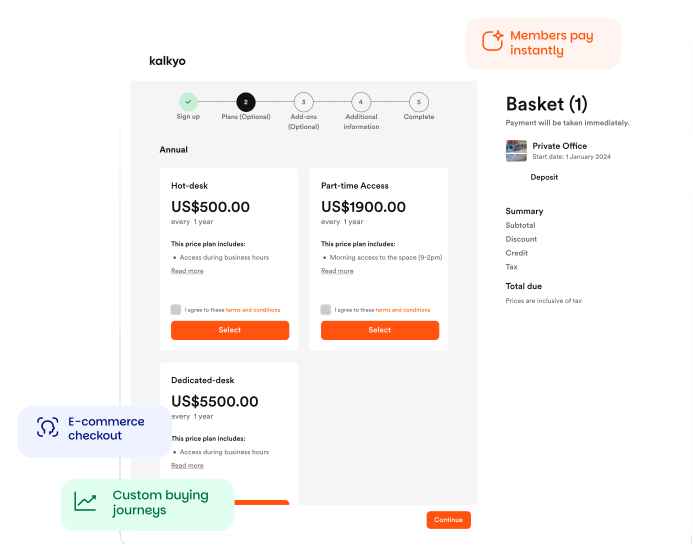
3. Security features for independent member access
Who’s coming and going in your space, and when? If you’re not sure, your space isn’t secure. Coworking software helps operators manage secure self-service access, visitor activity, and building permissions without relying on manual front desk processes.
Mobile check-ins
Coworking software helps operators manage secure self-service access, visitor activity, and building permissions without relying on manual front desk processes.
Door access control
Integrations with systems like Salto, Kisi, Brivo, and Tapkey let operators automate building access based on memberships, bookings, or schedules. This improves security while reducing manual access management.
Visitor management
Platforms can manage visitor passes, digital sign-ins, and host notifications, helping teams deliver a smoother arrival experience.
Audit logs and compliance
Access and booking activity can be logged centrally, helping operators monitor usage, manage permissions, and support compliance requirements.

Ivo Tabakov
Regional Sales Manager, UK and Europe
4. Community and engagement: building connections
The heart of any winning coworking space is its community. Let’s look at how flex space software is designed to connect people and encourage members to get involved.
What are member directories?
Coworking thrives on networking. Today’s software includes a searchable member directory where people can create profiles, add their bios, list their skills, and share their interests. It’s like a closed social platform, just for your space.
Events and programming
From weekly yoga classes to industry workshops and fireside chats, events are core levers for community. A dedicated event management tool inside the platform creates, promotes, and tracks attendance for free and ticketed member events. Features like waitlists and integrated ticketing systems really make event management shine.
Messaging and notifications
These days you dodge inboxes and reach people through push notifications, in-app messages, community boards and forums.
Built-in feedback loops
Understanding what members need and like helps you keep getting better. Coworking management software has polls, Net Promoter Score (NPS) prompts, and structured feedback forms. Operators gather insights on what members want more (or less) of, spot annoyances, and tweak offerings to fit.
Community walls or feeds
Like social media feeds, these are special spots in platforms and apps that let members post updates, ask questions, share resources, and chat with each other and staff. It’s a digital hangout for ongoing conversations, even when members aren’t physically in the space.
-
Ready to boost member happiness?
5 Ways coworking software lifts members’ experience
-
Read our guide to building coworking community
Build Stronger Community in the Workspace
5. Analytics, reporting, and integrations
Making decisions based on data and staying connected are key for growth and efficiency. Flexible workspace software helps you understand your business and connect with all the right tools.
You get some serious digital swag with the following functionality.
Custom reporting and dashboards
Coworking software isn’t just about running things; it’s about giving you insights. Customisable dashboards and reporting tools track the metrics you care about: bookings, revenue, member churn rates, space utilisation, and sales pipeline progress.
You can spot trends, optimise staffing, find upsell opportunities, and generally make smarter decisions – like seeing which membership plans are most popular or which meeting rooms are favourites.
Churn and retention signals
Keeping members before they leave is way better than trying to win them back. Advanced systems are built to flag warning signs that a member might be thinking of leaving. If you notice fewer app logins, plan downgrades, fewer bookings, or less engagement with community features, you can act early to address concerns and boost satisfaction.

Powering up with integrations
Your software’s ability to connect with other business tools brings big wins for operations. What can you link with?
- CRMs (like HubSpot, Salesforce), for managing leads, tracking sales interactions, and nurturing customer relationships.
- Accounting platforms (like Xero, QuickBooks), for automating financial reconciliation, managing expenses, and generating financial reports.
- Email marketing tools (like Mailchimp) for sending targeted newsletters, promotions, and community updates.
- Access control hardware for automated and secure entry management.
- IoT sensors for occupancy for real-time space utilisation data.
- Payment gateways for seamless and secure processing of member payments.
- Calendar tools (like Google Calendar, Outlook Calendar), for synchronising bookings and availabilityAPI and developer tools: Advanced operators and those with unique business models often prefer coworking software platforms with Application Programming Interfaces (APIs) and developer tools. This allows for custom workflows, bespoke dashboards, and unique integrations with other systems using middleware like Zapier or Make. It means the software can be expanded and tweaked perfectly for different operational needs, offering unmatched flexibility.
Nexudus really shines here (😏) with over 60 native integrations and an API-first model, giving you extreme flexibility.

Leonardo Santoro
Sales Operations Manager
-
How to onboard coworking members (and get them to value fast)
How to onboard coworking members
-
See who we integrate with
Nexudus integrations
Picking the right software
Choosing the perfect coworking platform for your space depends on your growth stage and plans. It’s pretty straightforward.
- Just getting started? Your main focus should be on core stuff like bookings, billing, and basic member management to get off the ground smoothly. Don’t go overboard with features you won’t use right away.
- Growing fast or planning multiple locations? You’ll need a platform with robust integrations, advanced automation, and detailed analytics. Managing multiple locations with one central dashboard and the ability to scale pricing are super important here.
- Established and fine-tuning? Focus on platforms that offer deep customisation, powerful data insights, and strong API capabilities to really dial in your operations and get the most value from your data.
Which tools support your operating model and niche?
- Community-focused space? Prioritise platforms with strong member engagement tools, lively community feeds, event management, and networking features.
- Corporate-focused or enterprise solutions? Look for coworking software that’s great at compliance, has strong security features, deep integrations with corporate systems (like HR or internal communication tools), and maybe white-labeling options for consistent branding.
- Niche space? Like wellness, creative, or industry-specific? Advanced platforms handle custom workflows, and offer branded apps and white-labelling.
Consider your team’s bandwidth and tech readiness
Your team needs to be able to figure your software out quickly. Look for platforms that have easy-to-use interfaces and are known for awesome support, have comprehensive guides, and thorough onboarding.
What about cost vs. value?
Some platforms charge per member, per space, or offer different plans.
Look at the total cost of ownership, implementation, ongoing support, and any potential add-ons. Don’t just pick the cheapest option; assess the value you get from the features and how they help your bottom line.
A profitable coworking space today often hits a profit margin of 10-20% for medium-sized spaces (50-150 members) and 20-30% or higher for larger spaces (150+ members). The right software directly helps by optimising space and operations.
Do they have happy customers?
Check out independent reviews and testimonials. What are current users saying about the software’s reliability, customer support, and features? Platforms like Nexudus, Yardi, Spacebring, and OfficeRnD are well-regarded in the industry, and looking into their specific features can give you valuable ideas for comparison.
-
Want advice before deciding? Here's 10 features found in Nexudus
10 Key Nexudus Features
-
Are you booking demos? Here's what to ask the software reps
11 Smart questions to ask in a coworking software demo
Knowing what coworking software is capable of might help with the search for a provider.
It’s always good to ask a company how they are developing their software, in other words, how are they working with customers? Knowing what kind of features they’re adding, and how they make decisions about new developments, will show you how they develop the software for market needs.
In the meantime, we’ve put together an article comparing the big names. It includes core capabilities for us, OfficeRnD, Cobot, Spacebring, and Optix. It’s an honest take: we aren’t fans of making us sound ‘better,’ but do believe we offer an affordable, truly flexible choice.
Want to compare different software?
The Coworking Software Showdown: Which Platform Should You Choose? Want to know more about
how Nexudus could help your business?
We’re here to answer any questions you have.
Latest articles
-

- Coworking
- Coworking Resources
Practical AI Lessons for Coworking Operators from GWA Denver 2026
Damian on October 1, 2026 -

- Coworking
- Coworking News
- Technology
AI didn’t add a feature to coworking software. It’s rewriting what the product is.
Jane Robathan on September 30, 2026 -

- Coworking
Advanced Coworking Analytics: When Standard Reports Fall Short
Emily Nguyen on September 15, 2026