

Home Location Sign-In Redirect
Customers logging in to multi-location spaces can now automatically sign in to their home location. A new Admin Panel setting sends members to their home location – the location that holds their invoicing business – as soon as they sign in. The setting is off by default, so nothing changes for your network until you turn it on.
New setting
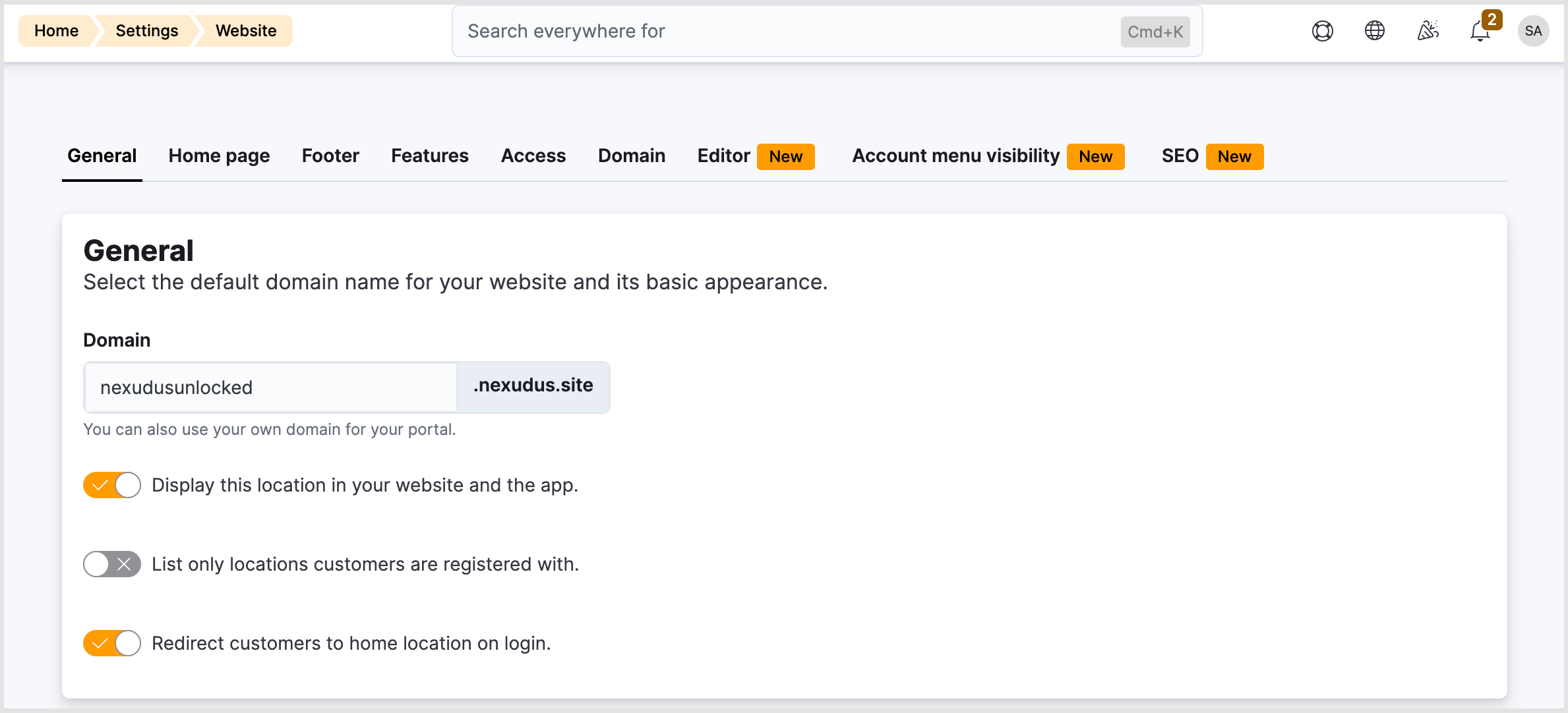
- In the Admin Panel, navigate to Settings > Website > General tab.
- Toggle Redirect customers to home location on login on.
- Click Save changes.
Setting turned ON
When the setting is on, the Members Portal/Passport app reads the member’s home location and takes them there.
Exception: Where a member was already on their way somewhere specific, the Members Portal respects that destination instead. For example, if a member logs in while in the middle of booking a resource at a different location, the system keeps them there so they can finish their booking without interruption.
Setting turned OFF
When the setting is off, members stay on the location they signed in through, exactly as they do today.
Members will still be able to manually switch locations themselves once they’ve logged in.
Want to know more about
how Nexudus could help your business?
We’re here to answer any questions you have.