

Training Team on June 15, 2026
eInvoicing Information on Customer Records
New eInvoicing section
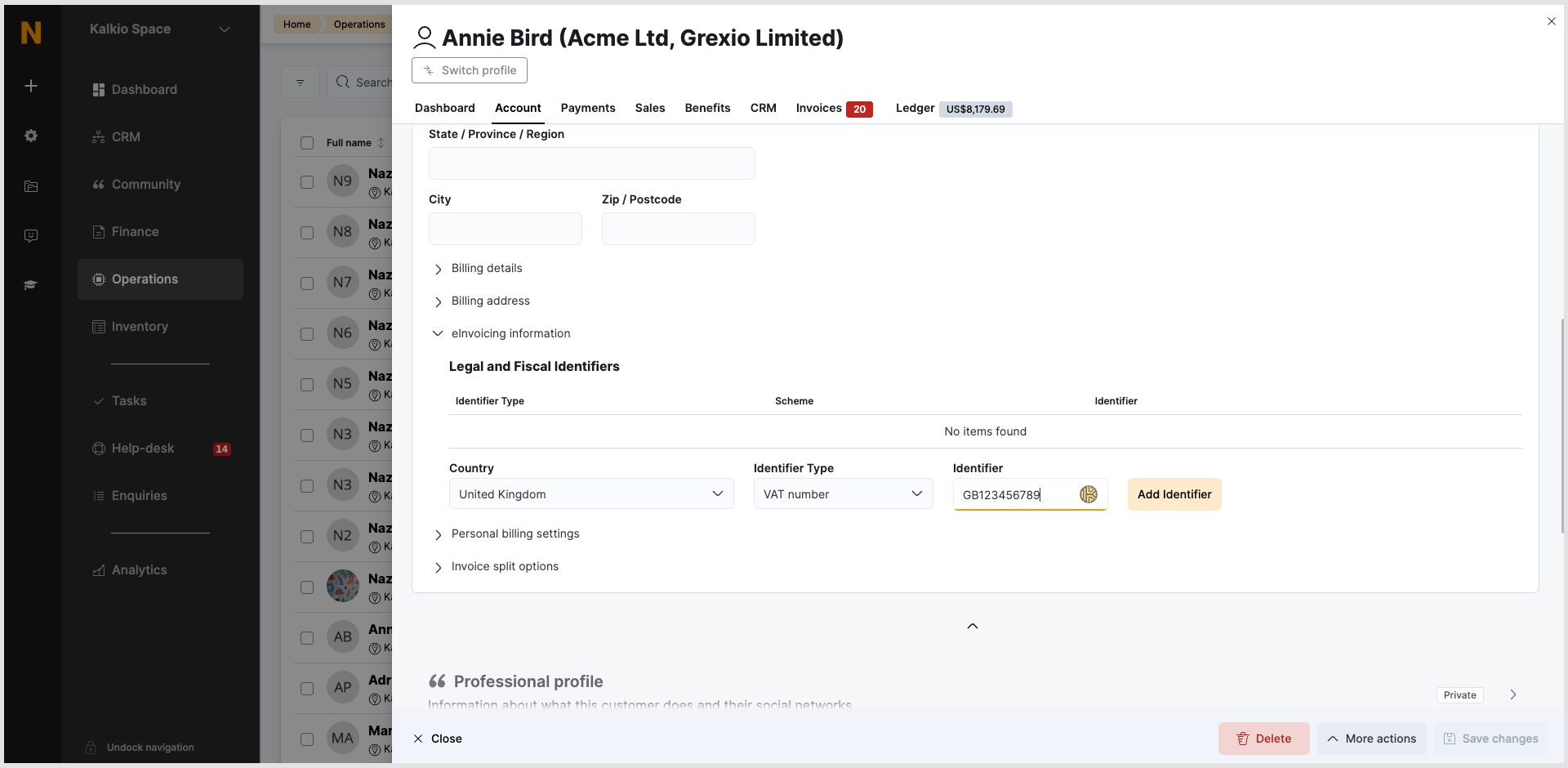
We’ve introduced a new eInvoicing section in customer records within the Admin Panel. This allows admins to store and manage customers’ legal and fiscal identifiers required for eInvoicing.
This update improves compliance and ensures all required invoicing data is centrally managed and easily accessible.
How to add the identifier:
- Go to: Operations → Members & Contacts → CRM → Customer record
- Open a customer profile
- Navigate to: Account tab → Contact and Billing section
- Locate the “eInvoicing information” section
- Click “Add identifier” and fill in all required fields
- Note: (The button remains disabled until all fields are completed.)
- Click ‘Save’.
Please note:
- The section is visible only when eInvoicing is enabled
- Identifiers can be edited or removed within the same section
- Changes are not saved automatically; they must be saved to take effect
Want to know more about
how Nexudus could help your business?
We’re here to answer any questions you have.