

Booking on behalf of team members

This latest feature has been designed and developed to provide your customers with a better experience when booking resources. Customers can easily place bookings on behalf of others from the Members Portal and Passport app. As an admin, you will be able to give more control and autonomy to teams to place their own bookings, freeing up your time that would have otherwise been used helping those customers.
Members Portal
Let’s take a look at the changes in the Members Portal.
Team settings
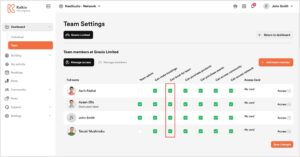
Before a customer can make bookings on behalf of their team members, they’ll need the appropriate permissions. Team admins can control this from the Members Portal.
Placing a booking
The booking screen will differ depending on the customer’s permissions and whether the resource can be booked simultaneously (i.e. hot-desks) or not (i.e. meeting rooms).
Below is a short video that demonstrates how a customer can place a booking for multiple team members. The customer has permission to book on behalf of others and they are booking a resource that can be booked simultaneously.
The customer will be unable to select more team members than the number of available resources. They will see a warning message if they try to select more. If the resource has less than 15% capacity available for the selected date and time, a ‘Low! X desks available’ message will be displayed.
When placing a booking for multiple team members, the system will automatically assign customers the last resource they booked. For example, if John Smith last booked hot-desk 1, the system will automatically assign them hot-desk 1. Otherwise, the system will just assign a free resource to the customer. The customer can manually select the specific resource for each team member.
If the customer were booking a resource that doesn’t allow simultaneous bookings, for example, a meeting room, the customer will only be able to select one name in the Booking for section.
Guests
When booking for multiple team members at once, guests cannot be added to bookings. The Guests section will be disabled when the customer is placing a multi-booking. Guests can be added by the individual team member once the booking has been confirmed.
Additional Services
Additional services can be added to multi-bookings. The customer placing the booking can select who should be invoiced from the drop-down list.
It is important to note that if the team does not have merged billing enabled, the customer will only be able to place a booking for one person at a time as it isn’t possible to raise multiple separate invoices in one transaction.
Editing booking
When a customer places a multi-booking on behalf of others, the system creates individual bookings for the relevant customers. So when you edit a multi-booking, you are editing the individual booking rather than the multi-booking. Team members can edit their bookings from their Dashboard and if they have the appropriate permissions, they can also edit their team member bookings from the Team Dashboard.
Want to know more about
how Nexudus could help your business?
We’re here to answer any questions you have.